Now available on the App Store

Train in your zone.
Any zone.

Set a target heart-rate range — recovery, aerobic base, tempo, threshold — and RateGuard taps your wrist the second you drift out of it. No staring at your Apple Watch.

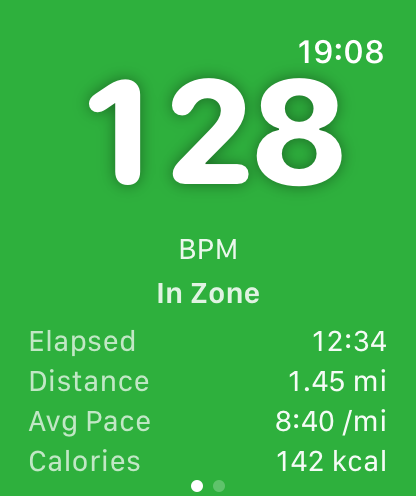
RateGuard on Apple Watch showing 128 BPM in the green zone with workout metrics

The workout you ruined without noticing

You head out for an easy Zone 2 run.

Ten minutes in, you've drifted into Zone 3. Twenty minutes in, you're running what's basically a tempo. You come home tired instead of fresh — no aerobic base built, no recovery banked, and not a second faster.

The session was already gone. You just never felt it slip.

Easy runs are the clearest example, but it's the same story for any range — tempo, threshold, recovery. RateGuard is the tap on the wrist that catches the drift the moment it starts.
Your watch already shows heart rate.
That was never the problem.

Knowing your heart rate and training by it are not the same thing. This is the difference RateGuard makes.

Apple Watch shows heart rate as one number buried among dozens of metrics.
RateGuard makes it the entire screen — blue, green, yellow, or red, readable mid-stride.
Apple Watch makes you raise your wrist and read to find out where you are.
RateGuard taps your wrist the moment you drift. No looking required.
Apple Watch tells you what your heart did after the run is over.
RateGuard keeps you in range while it still matters — during the run.

Your heart rate becomes impossible to ignore

A full-screen, color-coded display turns your watch into a live training signal. The current BPM stays large and readable even mid-stride — no menus, no charts, no squinting.

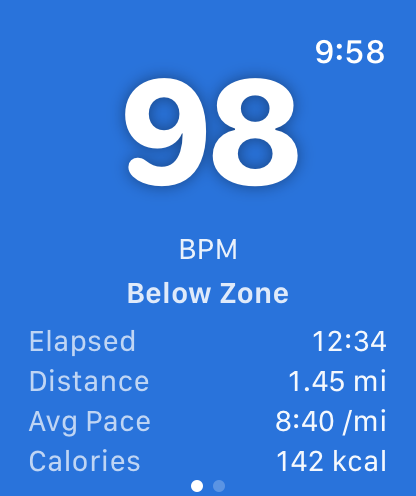
RateGuard below zone — 98 BPM on a blue full-screen background
Below zone
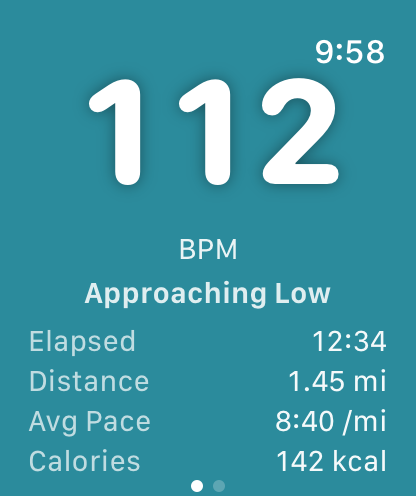
RateGuard approaching low — 112 BPM on a teal full-screen background
Approaching low
RateGuard in zone — 128 BPM on a green full-screen background
In zone
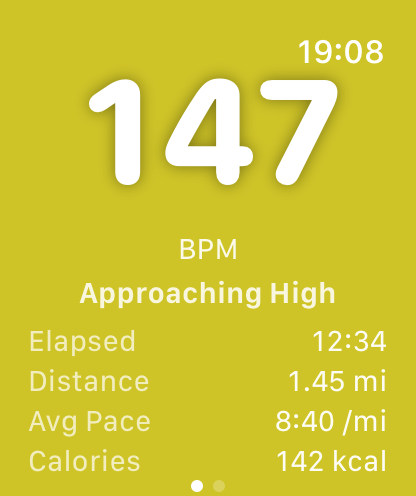
RateGuard approaching high — 147 BPM on a yellow full-screen background
Approaching high
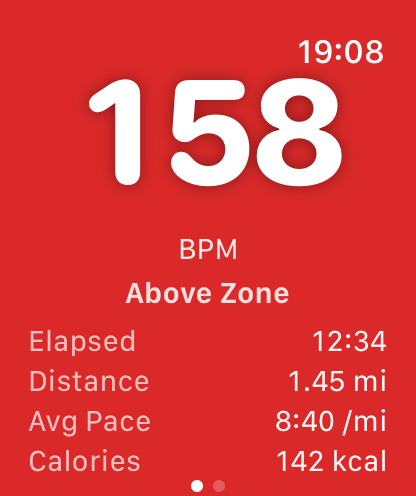
RateGuard above zone — 158 BPM on a red full-screen background
Above zone
Approaching high BPM with yellow zone shading

The watch tells you when to act — so you don't have to watch it

RateGuard taps your wrist the instant you're drifting too high or too low.

That's the whole point: you stop monitoring and start running. The watch keeps you honest.

  • One soft tap as you approach a threshold
  • A firm alert the moment you cross out of the zone
  • A confirming tap when you're safely back in
RateGuard showing the heart-rate zone during a workout

Your zone. Not a preset.

RateGuard guards one target range that you set — a low and a high BPM, dialed in with the Digital Crown. Whatever today's session calls for, set the band and go.

  • Recovery & easy days — keep the effort genuinely low so you show up fresh
  • Aerobic base / Zone 2 — hold the band that actually builds your engine
  • Tempo & threshold — sit right at the line without boiling over
  • Intervals & ceilings — know the instant you punch through your cap

One range at a time, set in seconds — change it whenever your training does.

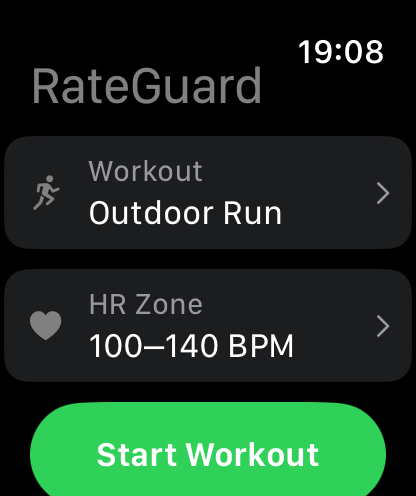
RateGuard setup screen showing workout type and heart-rate zone selection

Set it up in under a minute

No account, no sync, no dashboard to configure. Open the app and go.

  1. Pick your workout — run, walk, or cycle (indoor or outdoor), plus HIIT, strength, or Other.
  2. Dial in your range — spin the Digital Crown to your low and high BPM. RateGuard keeps a small buffer on each side for early warnings.
  3. Start — tap Start Workout and put your wrist down.
  4. Just train — color and wrist taps keep you honest; the full workout saves to Apple Health at the end.

Your range is remembered for next time, so day-to-day it's two taps and go.

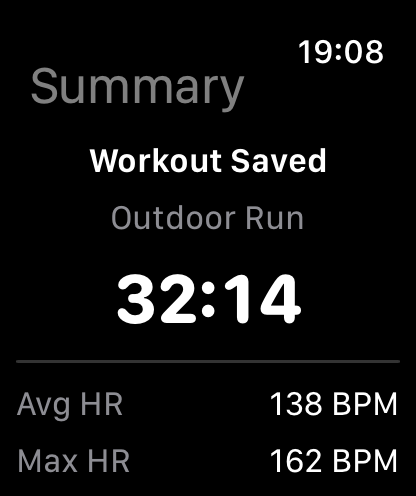
Workout summary showing avg HR, max HR, distance, calories, time in zone

Proof you held the line

Every workout saves to Apple Health with the numbers that matter for zone training — including how long you actually stayed in range.

  • Time in zone
  • Average & max heart rate
  • Distance & pace
  • Elapsed time & calories

No overloaded dashboards. No tiny unreadable complications.

Everything you need.
Nothing in the way.

Live zone monitoring

Continuous heart-rate tracking with immediate, full-screen visual feedback.

Wrist haptics

Get alerted the instant you approach or cross your target zone.

Apple Health

Workouts save directly into Apple Health and Fitness.

Outdoor tracking

Capture route and distance for outdoor workouts.

Fast start

Open the app, set your zone, and go.

Built for motion

Designed for sweat, glare, and quick glances — nothing else.

If you train by heart rate, this is for you

The people who feel RateGuard's value immediately are the ones whose results live and die by staying in a range.

Zone 2 & aerobic base

Hold the easy band that builds your engine instead of sliding into a tempo.

Tempo & threshold

Ride the redline without tipping over it and blowing up the session.

Recovery days

Keep easy days easy so you show up fresh for the hard ones.

Long runs & marathon

Hold target effort when fatigue tries to drag your heart rate up.

One glance tells you everything

Bold typography and full-screen color states so you instantly know where you stand. Blue means pick it up, green means hold, yellow means ease off, red means back off.

RateGuard workout setup screen with workout type and heart-rate zone RateGuard below-zone screen, blue RateGuard in-zone screen, green RateGuard workout summary with average and max heart rate, distance, calories, and time in zone

Train in the right zone. Every session.

RateGuard taps your wrist the moment you drift out of your range — so you stay where the work actually happens, without watching the screen.